


Zoho One Expands Its Operating System: What the Addition of Zoho Vani and Zoho LandingPage Means for Your Enterprise.

When enterprise technology stacks expand by acquisition or uncoordinated purchasing, friction inevitably follows. Marketing teams pay for Unbounce or Instapage to build campaign landing pages, while design and strategy teams run separate subscriptions for Miro, FigJam, or Mural to map processes and brainstorm. Meanwhile, sales and CRM operations sit in a third ecosystem altogether. Data gets trapped, user provisioning becomes an administrative nightmare, and software licensing costs balloon across departments.
Zoho’s philosophy with Zoho One—the flagship "Operating System for Business"—has always been the direct opposite: eliminate fragmented point solutions by providing a single, tightly integrated cloud operating platform.
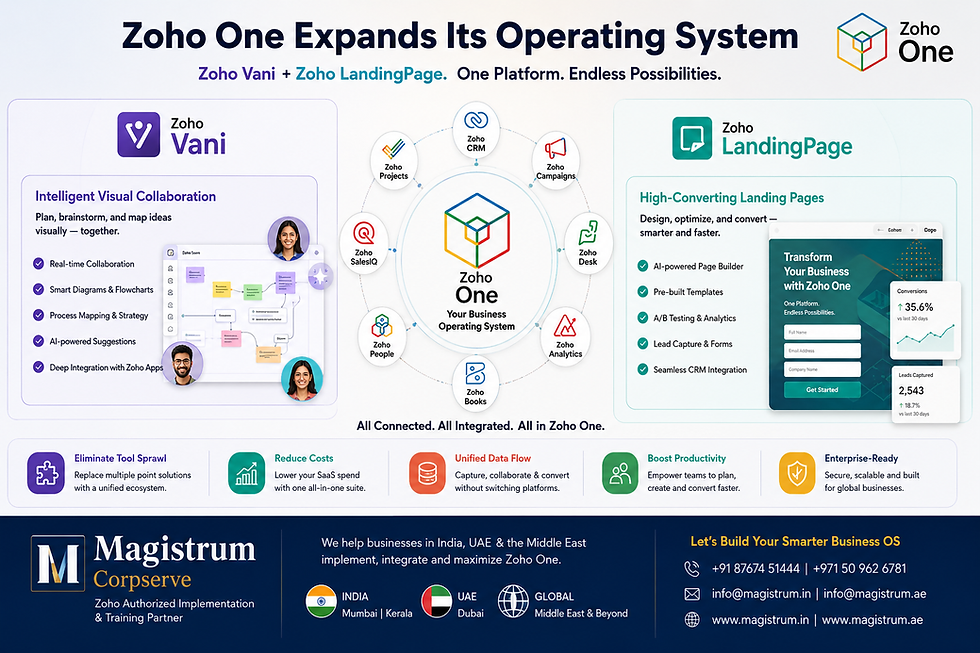
With the official inclusion of Zoho Vani (an intelligent visual collaboration platform) and Zoho LandingPage (a high-conversion landing page builder with built-in AI optimization) into the native Zoho One application suite, Zoho has closed two of the most persistent operational gaps in modern digital business.
For organizations across India, the United Arab Emirates (UAE), the wider Middle East (GCC), and global markets, this expansion isn't just a minor feature update. It is a strategic shift that redefines how cross-functional teams brainstorm, map workflows, build lead capture engines, and route conversion data directly into their core business software—all under a single subscription.
At Magistrum Corpserve, as an authorized Zoho Implementation and Training Partner operating across India (Mumbai & Kerala) and the UAE (Dubai), we see this expansion through a pragmatic lens: How does this reduce system complexity, eliminate redundant SaaS spend, and accelerate your time-to-value?
Here is a comprehensive breakdown of what Zoho Vani and Zoho LandingPage bring to the table, how they integrate into your existing Zoho One architecture, and how to implement them effectively across your organization.
The Strategic Expansion of the Zoho One Operating System
To appreciate why the addition of Vani and LandingPage is significant, you have to look at how modern teams actually work versus how their software stack is structured.
Most enterprises operate on a hybrid or multi-office model across geographic regions. A business headquartered in Dubai with operational hubs in Mumbai and client teams in Europe typically faces two operational bottlenecks:
The Ideation-to-Execution Gap: Teams conceptualize campaign ideas, system architectures, and process flows on external whiteboarding tools. Once approved, someone has to manually re-type those ideas into Zoho CRM, Zoho Projects, or Zoho Desk. Knowledge is lost in translation.
The Lead Capture Disconnect: Marketing teams build campaign landing pages on third-party web builders. The lead data is sent to Zoho CRM via basic webhooks or Zapier, leading to lost tracking parameters, duplicate records, broken integrations, and zero visibility into the visitor's post-click behavior.
+-----------------------------------------------------------------------+
|                       TRADITIONAL FRAGMENTED STACK                    |
|                                                                       |
|  Miro / Mural --------> Manual Data Entry --------> Zoho Projects     |
|  (Ideation Silo)        (Human Error & Delays)       (Execution)      |
|                                                                       |
|  Unbounce / Elementor --> Webhook / Zapier -------> Zoho CRM          |
|  (Lead Capture Silo)   (Broken Tracking & Dups)    (Sales Pipeline)   |
+-----------------------------------------------------------------------+
                                   VS
+-----------------------------------------------------------------------+
|                    UNIFIED ZOHO ONE ECOSYSTEM                          |
|                                                                       |
|  Zoho Vani (Visual Canvas) ===== Native Direct Link =====> Zoho Apps   |
|  Zoho LandingPage (Conversion) == Native Sync ========> Zoho CRM/IQ   |
+-----------------------------------------------------------------------+
By embedding Vani and LandingPage directly inside Zoho One, Zoho unifies ideation, execution, conversion, and relationship management inside a single security and administrative umbrella (Zoho Directory).
Zoho Vani: Replacing Visual Collaboration Silos
What Is Zoho Vani?
Zoho Vani is an enterprise-grade visual collaboration platform designed for real-time and asynchronous teamwork. It combines infinite digital whiteboards, mind mapping, structural diagramming, contextual voice/video interaction, and AI-driven canvas automation into a single workspace.
Rather than acting as just a static "drawing board," Vani functions as a living process map. It gives cross-functional teams the tools to turn abstract ideas into actionable project structures without leaving the Zoho ecosystem.
Key Capabilities of Zoho Vani Inside Zoho One
1. Infinite Canvas, Spaces, and Zones
Workspaces in Vani are organized into Spaces (team- or department-level folders) and Zones (individual infinite canvases). Whether you are mapping a multi-tier cloud deployment or running a creative design review, the canvas grows continuously without rigid page breaks or slide limitations.
2. Process Mapping and Diagramming Architecture
Vani comes with structured diagramming toolkits—including flowcharts, decision trees, customer journey maps, and engineering system flows.
Pre-built Technical Kits: Includes infrastructure drag-and-drop elements (such as AWS architecture kits) to render technical setups visually.
Process Standardization: Operations managers can visually draft standard operating procedures (SOPs) and embed them into team spaces for onboarding and compliance audits.
3. Embedded Real-Time and Asynchronous Communication
Context switching kills focus. Jumping out of a design canvas to start a Zoom call or write a Slack message fragments the team's attention.
Built-in Video Meetings: Teams can launch a live video call directly inside the Vani Zone. Every participant sees live cursor movements, pins, and annotations in real time.
Contextual Voice Notes and Comments: Team members can leave audio clips, text comments, or emoji reactions directly on specific elements (e.g., a specific step in a CRM blueprint or a UX wireframe).
Asynchronous "Flow": Distributed teams operating across different time zones (e.g., UAE and India) can use Vani’s Flow feature to replay canvas discussions and step-by-step evolution without needing a live meeting.
4. Zia AI Assistance on the Canvas
Zoho’s Zia AI is integrated directly into Vani. Teams can prompt Zia to instantly generate flowcharts, mind maps, or structured organizational charts from raw text prompts, bypassing the initial "blank canvas" delay.
Zoho LandingPage: A High-Conversion Campaign Engine
What Is Zoho LandingPage?
Zoho LandingPage is a dedicated, conversion-centric landing page builder engineered specifically for digital marketers, demand generation teams, and performance advertising specialists.
While standard website builders (like Zoho Sites or WordPress) focus on general site architecture, Zoho LandingPage focuses exclusively on conversion rate optimization (CRO): fast page loads, dynamic popups, precise A/B testing, and direct synchronization with sales and marketing automation platforms.
Key Capabilities of Zoho LandingPage Inside Zoho One
1. Visual Drag-and-Drop Page & Popup Builder
Marketers can build responsive, highly customized landing pages and targeted popups without writing code.
Reusable Saved Sections: Pre-design custom brand headers, testimonials, pricing tables, and footer blocks, then reuse them across dozens of distinct campaign landing pages.
Device-Specific Customization: Adjust layouts, padding, and visible elements independently for desktop, tablet, and mobile displays.
2. Native Lead Capture & Zoho Ecosystem Integration
This is where the inclusion in Zoho One provides immense value:
Direct Zoho CRM Sync: Leads captured on a landing page pass directly into Zoho CRM with custom field mappings, lead source tagging, and campaign attribution intact.
Zoho SalesIQ Embedded Analytics & Live Chat: Deploy proactive chatbots and track visitor behavior in real time from the moment they hit the landing page.
Zoho Checkout Integration: Sell products, accept event bookings, or collect retainer payments directly on the landing page through embedded payment forms.
Zoho Campaigns Integration: Trigger automated drip email nurture series instantly upon form submission.
3. AI-Powered Copy and SEO Optimization (Zia AI)
Zoho LandingPage incorporates Zia AI to refine messaging and SEO performance before pages go live:
Generative Copywriting: Generate headline variations, benefit bullets, and call-to-action (CTA) text tuned to specific buyer personas.
SEO Insights Assistant: Analyzes the page against search engine best practices, flagging missing metadata, alt tags, keyword density gaps, or page speed issues.
4. Advanced Domain and Workspace Management
Enterprise organizations managing multiple brands or client accounts can configure multiple custom domains, SSL certificates, custom favicons, and dedicated sub-workspaces, ensuring brand isolation and security compliance.
Practical Enterprise Use Cases Across Departments
To understand how Vani and LandingPage function within a live Zoho One environment, consider these four department scenarios:
1. Marketing & Lead Generation
The Workflow: The marketing team opens a Zoho Vani Zone to brainstorm a product launch campaign for the Middle East market. Copywriters, graphic designers, and performance marketers collaborate visually, pinning ad creatives, headline ideas, and target audience personas on the infinite canvas.
The Handoff: Once the layout is approved, the team builds the campaign destination using Zoho LandingPage. They connect the page to their custom domain, embed a Zoho CRM lead form, and activate Zoho SalesIQ tracking.
The Result: Ads drive traffic to a page loading in under 1.5 seconds. Leads flow cleanly into Zoho CRM, triggering an automated email sequence in Zoho Campaigns and assigning follow-up tasks to sales reps in Dubai and Mumbai.
2. IT, Systems Architecture & Process Engineering
The Workflow: A enterprise systems architect needs to design a multi-department CRM, Finance, and HR workflow across Zoho Books, Zoho CRM, and Zoho People.
The Handoff: Instead of using third-party flowchart tools, the architect draws the system layout in Zoho Vani. Department heads join a live video call directly on the Vani canvas to review the process blueprint, drop voice comments on conditional routing rules, and approve the architecture.
The Result: The final blueprint serves as a living standard operating procedure (SOP), directly linked within the organization's enterprise documentation.
3. Product Management & UX Design
The Workflow: Product managers use Vani to lay out feature roadmaps, build wireframes, and run asynchronous design critiques with offshore development teams.
The Handoff: Developers leave contextual technical feedback directly on the wireframe components. Once approved, tasks are generated in Zoho Projects.
4. HR, Onboarding, and Corporate Training
The Workflow: HR teams design interactive visual orientation pathways in Vani for new hires across global locations.
The Result: New recruits navigate interactive mind maps containing embedded video guides, links to company policy documents, and training milestones.
The Magistrum Corpserve Strategic Approach
Having software tools available in a enterprise suite like Zoho One is one thing; translating those tools into streamlined operations, measurable efficiency, and clear ROI is another.
At Magistrum Corpserve, operating through Magistrum Corpserve Private Limited (India - Mumbai & Kerala) and Magistrum Corpserve Solutions LLC (Dubai, UAE), we bridge the gap between software capability and practical enterprise execution.
+-----------------------------------------------------------------------+
|              MAGISTRUM CORPSERVE IMPLEMENTATION METHODOLOGY            |
|                                                                       |
|  [1. Audit & Architecture]                                             |
|   - Stack rationalization & software consolidation                     |
|   - Security, permissions, and domain mapping                         |
|                                                                       |
|  [2. Custom Implementation & Integrations]                            |
|   - Zoho LandingPage -> CRM -> Finance pipeline configuration          |
|   - Vani process template buildout & canvas structuring                |
|                                                                       |
|  [3. Data Migration & Security Protocol]                              |
|   - Clean migration from legacy tools (Miro, Unbounce, WordPress)     |
|   - Role-based permissions across India, UAE & GCC hubs               |
|                                                                       |
|  [4. Practical Training & Certification]                              |
|   - Hands-On Accountancy Training using Spreadsheets (HATS)           |
|   - User certification & role-specific operational training           |
|                                                                       |
|  [5. Ongoing Strategic Support]                                       |
|   - Post-launch optimizations, workflow audits & ongoing maintenance  |
+-----------------------------------------------------------------------+
Our End-to-End Service Lifecycle
1. Software Stack Consolidation & Audit
Many organizations pay thousands of dollars annually for redundant SaaS subscriptions. We conduct a thorough audit of your technology stack across departments, identifying redundant point solutions (such as standalone landing page builders or whiteboarding tools) that can be decommissioned in favor of your native Zoho One license.
2. Custom Implementation & Workflow Orchestration
We don't just enable app toggles; we architect full-funnel workflows:
LandingPage Setup: Domain mapping, SSL configuration, custom script integrations (Google Tag Manager, Meta Pixels), custom lead form rules, and deep field mapping into Zoho CRM and Zoho Finance applications (Books, Inventory, Checkout).
Vani Ecosystem Structuring: Setting up organized Spaces and Zones with custom enterprise templates for process mapping, sprint planning, and campaign design.
3. Data Migration & Multi-Regional Compliance
Transitioning from external tools requires careful data handling. We oversee secure migration of landing page assets, design files, and lead capture structures while ensuring compliance with data privacy regulations across India, the UAE (PDPL), and global standards (GDPR).
4. Industry-Ready Training & Official Certification
Software adoption fails when end users aren't trained on real-world workflows. Magistrum Corpserve is widely recognized for practical, career-focused training and certification programs:
Role-Based Corporate Training: Training sales, marketing, and operations teams on how to use Vani and LandingPage in their daily routines.
Flagship HATS Program: Our Hands-On Accountancy Training using Spreadsheets (HATS) program builds rock-solid accounting and operational fundamentals, preparing professionals to manage cloud applications like Zoho Books, Zoho Inventory, and Zoho CRM with confidence.
Authorized Certification Programs: Delivering official training that bridges theoretical understanding with hands-on technical execution.
5. Long-Term Managed Support
From our operational centers in India and Dubai, we provide ongoing maintenance, workflow adjustments, performance optimizations, and technical support across time zones.
Implementation Roadmap: Activating Vani and LandingPage in Zoho One
If your organization already utilizes Zoho One, follow this phased blueprint to rollout Vani and LandingPage smoothly across your teams:
Phase 1: Administrative Setup and Domain Configuration
Step 1: User Provisioning in Zoho Directory
Log into the Zoho One Admin Panel. Assign Zoho Vani and Zoho LandingPage access permissions to relevant team members based on their roles. Define Admin, Editor, and Viewer privileges to maintain data governance.
Step 2: Custom Domain Mapping in Zoho LandingPage
Navigate to Zoho LandingPage settings and connect your corporate domain or campaign subdomains (e.g., promo.yourcompany.com). Configure your CNAME and TXT records in your DNS manager and enable automatic SSL certificate generation.
Phase 2: Building Your Conversion & Collaboration Workflows
Step 3: Map Campaign Structures in Zoho Vani
Create a dedicated Space in Vani for your upcoming marketing or operational initiative. Use the infinite whiteboard to map out the buyer journey, outline necessary campaign assets, and assign ownership to designers and copywriters using contextual tags and comments.
Step 4: Construct High-Conversion Pages in Zoho LandingPage
Select a conversion-optimized template or start from a blank canvas. Drag and drop structured page elements, configure Zia AI content suggestions, build custom lead capture forms, and test responsive layouts across mobile and desktop previews.
Phase 3: System Integration and Lead Flow Verification
Step 5: Configure CRM & Analytics Integrations
Connect your published landing page directly to Zoho CRM:
Map page form fields to CRM Lead/Contact modules.
Set up automated lead assignment rules based on territory (e.g., routing GCC leads to the Dubai office and Indian leads to the Mumbai team).
Enable Zoho SalesIQ tracking code deployment for visitor session analytics and proactive live chat engagement.
+------------------------------------------------------------------------+
|                      END-TO-END LEAD CAPTURE ARCHITECTURE              |
|                                                                        |
|  [ Visitor Hits Landing Page ]                                         |
|                 |                                                      |
|                 v                                                      |
|  [ Zoho LandingPage (Zia SEO + SalesIQ Analytics Tracking Active) ]    |
|                 |                                                      |
|                 +---> [ Form Submission ]                              |
|                 |          |                                           |
|                 |          v                                           |
|                 |   [ Direct Native Sync ]                             |
|                 |          |                                           |
|                 |          v                                           |
|                 |   [ Zoho CRM ] ------------------+                   |
|                 |   - Auto Lead Assignment         |                   |
|                 |   - Territory Tagging (UAE/IN)   |                   |
|                 |          |                       |                   |
|                 |          v                       v                   |
|                 |   [ Zoho Campaigns ]     [ Zoho Checkout ]           |
|                 |   - Auto Nurture Drip    - Direct Retainer Payment   |
+------------------------------------------------------------------------+
Step 6: End-to-End Testing & QA
Submit test leads to verify data accuracy across CRM modules, trigger automated drip emails in Zoho Campaigns, and confirm that tracking parameters (UTM tags) record correctly.
Software Comparison: How Zoho One Eliminates Point Solution Costs
To illustrate the financial impact of bringing these capabilities into your single Zoho One subscription, look at the standalone costs of equivalent enterprise point solutions:
Software Category | Standalone SaaS Tool | Typical Cost Per User / Month | Equivalent Zoho One Application | Included in Zoho One? |
Visual Collaboration | Miro / Mural / FigJam | $8 – $16 / user / month | Zoho Vani | Yes (Native) |
Landing Page Builder | Unbounce / Instapage | $99 – $199 / month (flat) | Zoho LandingPage | Yes (Native) |
CRM & Pipeline | Salesforce / HubSpot | $75 – $150 / user / month | Zoho CRM | Yes (Native) |
Live Chat & Tracking | Intercom / Drift | $74 – $100 / month | Zoho SalesIQ | Yes (Native) |
Form Builder | Typeform / Wufoo | $25 – $83 / month | Zoho Forms | Yes (Native) |
By consolidating standalone tools into Zoho One, enterprises routinely slash overall software licensing spend by 40% to 60% while simultaneously removing integration maintenance overhead.
Maximize Your Zoho One Investment with Magistrum Corpserve
The expansion of Zoho One to include Zoho Vani and Zoho LandingPage offers a major competitive advantage for businesses aiming to operate efficiently across India, the UAE, the Middle East, and worldwide. However, software features alone do not transform a business—structured implementation, thoughtful customization, and ongoing team adoption do.
At Magistrum Corpserve, we specialize in turning the multi-application Zoho One platform into a custom-engineered business machine tailored precisely to your operational workflows.
Whether you need:
A complete audit and consolidation of your current SaaS stack,
Tailored implementation and data migration for Zoho One applications,
Deep integration of Zoho CRM, LandingPage, SalesIQ, and Finance applications, or
Hands-on corporate training and certification for your staff across India, the UAE, and global offices,
Our team of certified Zoho consultants and implementation engineers is ready to help you execute smoothly.
Ready to Upgrade Your Business Operations?
Get in touch with Magistrum Corpserve today:
Website: www.magistrum.in
Email: sales@magistrum.net
India (Mumbai & Kerala): +91 92071 99995 | +91 86065 90474
UAE (Dubai): +971 58 899 1583 | +971 4 386 5984


Comments